Privacy & Safety
Privacy & Safety in Support Groups
Overview
Your privacy and comfort are at the heart of every MentalHappy group 💜 When you feel safe, you can share openly and connect in a meaningful way.
This guide will help you understand:
- How your privacy is protected
- What controls you have
- What to expect when joining and participating in a group
Before You Begin
- You must be logged into your MentalHappy account
- You must Join a group as a Member to participate
- Followers can view updates but cannot chat or join sessions
Group Privacy Settings
Each group has visibility and access controls inside the Settings tab, managed by the Group Leader.
Group Visibility
● ON
Visible: Your group can be discovered by other MentalHappy members on Explore.
○ OFF
Hidden: Your group is not discoverable — accessible only via direct link or invite.
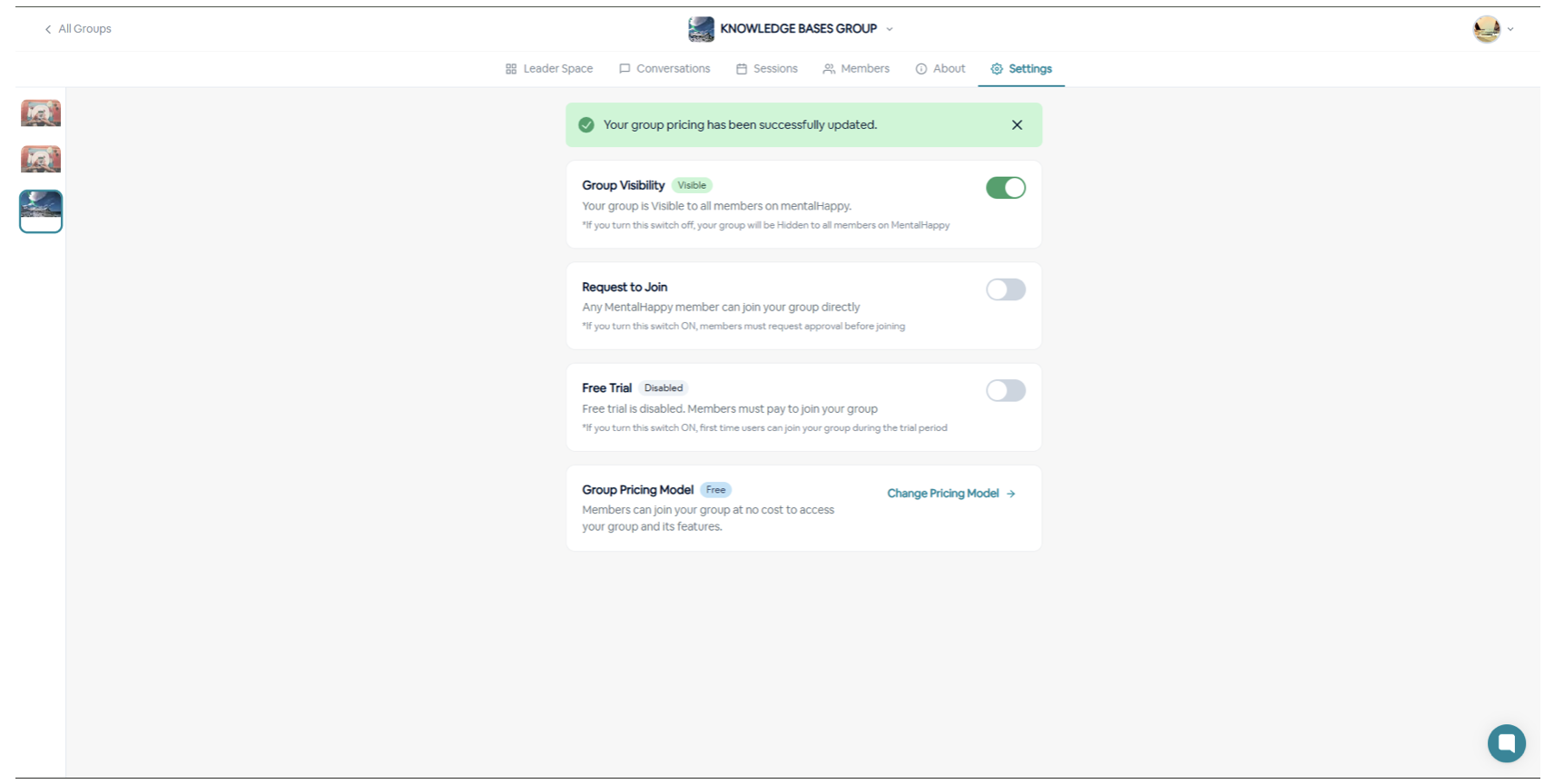
Even if a group is visible, it is still inside MentalHappy's secure environment.
Access to Join the Group
● ON
Open to Members: Anyone on MentalHappy can join immediately.
○ OFF
Approval Required: You must request to join and wait for the Group Leader's approval.
Invite-Based Access
🔗 How to Find & Use a Group Link
- Option 1: Click or tap a group link shared via email, SMS/WhatsApp, social media, or direct invite
- Option 2: Go to Explore Groups and click on a group card
The link opens the Group Page where you can view group details, the Group Leader, and pricing (if applicable).
📋 Listing Group (Preview Mode)
- View the group details
- Click Follow to stay updated
- Join sessions
- Access member-only content
✅ Active Group (Live Group)
- Click Join Group or Request to Join
- Attend sessions after joining
- Access resources and materials
- Participate in the community
Follow = Stay updated without committing. Join = Full access and participation. If you're unsure, follow first — then join when you're ready.
Your Privacy Controls as a Member
You are always in control of how much you share.
Camera Control
Keep your camera off during sessions — you are never required to show your face.
Name & Identity
Use your first name or a nickname — you choose how to present yourself.
Listening Only
Choose to listen without speaking — participation is always at your own pace.
Anonymous Questions
If enabled, submit questions anonymously — your name will not be shown.
No Direct Messaging: Members cannot send private messages to each other. All conversations happen inside the group — this prevents unwanted contact and protects your boundaries.
Protecting Group Content
What happens in the group stays in the group.
No screenshots of group content
No recordings of sessions
No downloading group content
No sharing member stories outside the group
All sessions and data are encrypted
MentalHappy is HIPAA-compliant
Payments secured by Stripe — leaders never see your payment details
Sessions accessible inside MentalHappy only
Group Guidelines for Members
🤝 Keep the Space Safe for Everyone
- Respect privacy — do not share others' stories outside the group
- Be kind — no hate, judgment, or harassment
- Speak from your own experience using "I" statements
- Remember: this is peer support, not therapy
Safety & Crisis Support
🚨 MentalHappy groups are not emergency services
911
Emergency Services
Call if you or someone else is in immediate danger
Call if you or someone else is in immediate danger
988
U.S. Suicide & Crisis Lifeline
Call or text 988 for mental health crisis support
Call or text 988 for mental health crisis support
If another member seems in crisis, encourage them to seek immediate help. Report issues via in-app support or support@mentalhappy.com.
Participation & Consent
✋ You Are Always in Control
- You can skip any question or prompt
- You don't have to share anything you're not comfortable with
- You can leave a session at any time
Consent is ongoing — your comfort comes first, every session.
End-to-End Privacy Flow
Best Practices for Staying Safe
✨ Recommendations
- Start by listening before sharing
- Use a nickname if you prefer more privacy
- Join private groups for sensitive topics
- Always attend sessions inside the platform
- Avoid sharing personal details too quickly
- Never try to contact members outside the platform
If something feels uncomfortable, you can leave anytime or report it via in-app support.
Troubleshooting
I feel uncomfortable in a group
Leave anytime or report via in-app support
Someone broke privacy rules
Report via in-app support or email support@mentalhappy.com
Not sure about group privacy settings
Check Settings → Privacy section on the group page
You deserve a safe space to connect 💜
You are never required to share more than you want. Take your time and participate in a way that feels right for you.